
How to Pass Dynamic Values to Inputs in Angular?

TL;DR :-
This blog covers how to pass dynamic values to form inputs in Angular, including step-by-step guides for both Reactive and Template-Driven forms.
It explores key techniques for managing dynamic updates using setValue(), patchValue(), and more.
Angular, one of the most widely used front-end frameworks, also offers two strong tools for handling forms: Reactive Forms and Template-Driven Forms.
Both approaches offer a proper structure for managing user input, validation, and dynamic updates to form controls.
Whether you are pre-filling form input with values from an API, reacting to user input and updating fields, or responding to form submission in various forms, Angular has flexible forms of forms.
In this blog, we’ll be learning how to pass dynamic values to inputs in Angular and doing so in both Reactive and Template Driven forms, as well as the slight differences between the two.
What is a Reactive Form, and How to Pass Dynamic Values?
Reactive Forms in Angular employ a distinct, model-oriented approach to create forms.. They enable you to specify form controls, such as FormGroup and FormControl, in the component class itself, which gives you control over the form and makes it easily testable.
That simplifies handling of complicated forms that need to be validated in real-time, or with conditional logic, or dynamic form value manipulation.
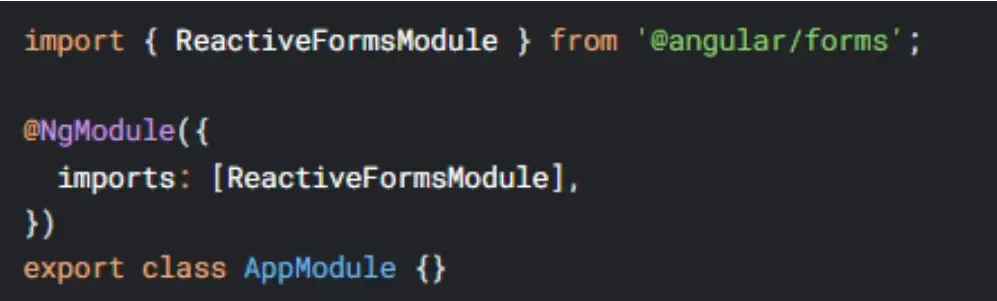
Step 1: Set Up ReactiveFormsModule
The initial step in utilizing Reactive Forms is to include ReactiveFormsModule in the Angular module. This module is utilized for generating form controls and overseeing form state.
Ready to Take Your Angular Development to the Next Level with Soft Suave?
Our team is skilled in delivering high-quality Angular solutions that meet your business objectives. Start today and see the difference our developers can make.
Start Now
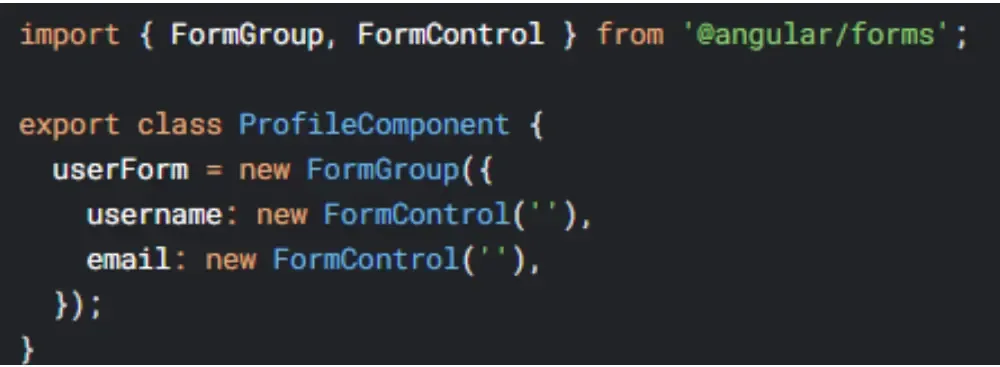
Step 2: Create a Form Group
In your Component, you create a FormGroup that contains your form controls.
Step 3: Update Values Dynamically
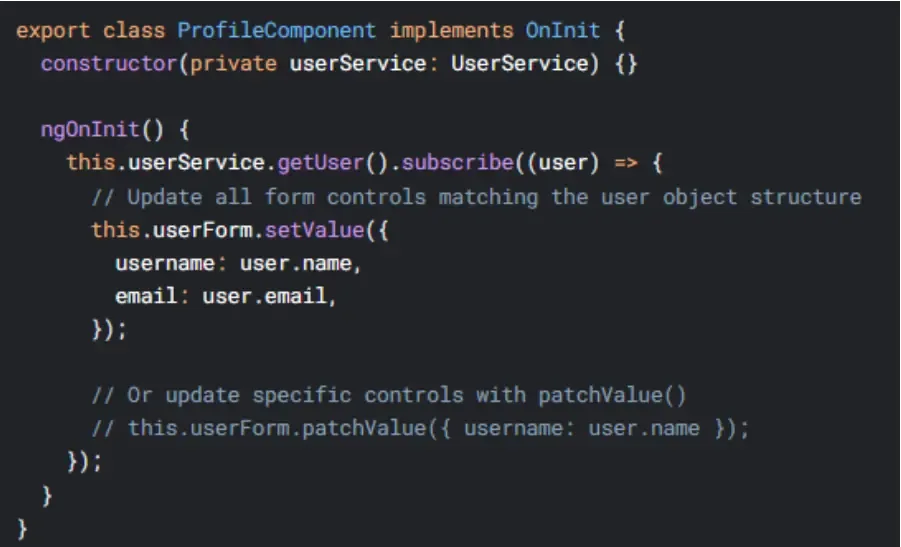
After the form is created, you can always populate the values on the fly using either setValue() or patchValue().
Struggling with Angular Development Challenges?
Facing hurdles with your Angular development? Our expert Angular team is here to ensure seamless dynamic handling and efficient solutions for your project.
Hire Experts NowStep 4: Bind the Form to the Template
Use the ‘formControlName’ directive in your HTML template to associate form controls with the inputs.

What is the difference between setValue() vs patchValue()?
In Angular Reactive Forms, `setValue()` requires specifying values for all form controls in the group/array, making it ideal for full updates (e.g., resetting a form with complete data).
In contrast, `patchValue()` allows updating specific controls without affecting others, offering flexibility for partial updates (e.g., dynamically changing a single field based on user input or API responses).
What is a Template-Driven Form, and How to Pass Dynamic Values?
Template-Driven Forms are intended to be a more compilation-friendly, less complex method for working with forms in Angular.
Instead of expressing form controls in the component class or writing full-blown components to try to manage form state, you leverage the template to track what’s going on through directives such as ngModel and ngForm.
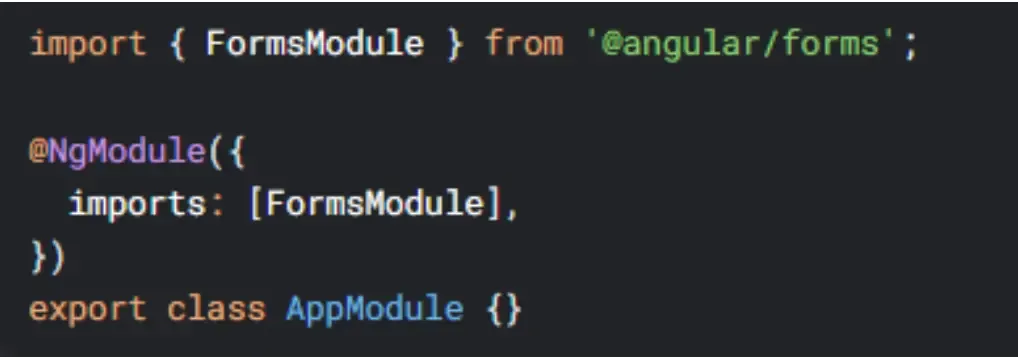
Step 1: Import FormsModule
Prior to using Template-Driven Forms, remember to import FormsModule in your Angular module:
Step 2: Bind Inputs with ngModel
In the template, connect input elements using two-way data binding with [(ngModel)] to values in the component. This will enable two-way value binding which means if the input field value changes or model value changes automatically it gets automatically updated.
You then apply it like:

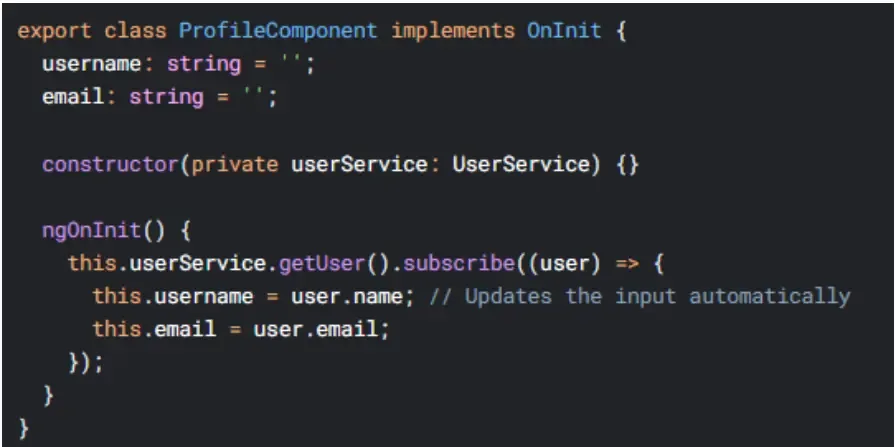
Step 3: Update Values in the Component
Form inputs can be given dynamic values by binding them to properties of the component that you can interact with.
It can be something like the values going in the properties of your components if you fetch data from an API.
Get a 40-Hour Free Trial for Angular Development & Maximize Your Project’s Potential!
Experience the expertise of Soft Suave’s Angular developers with a 40-hour free trial. See firsthand how our team can elevate your Angular project.
Claim Free TrialAlternative: Use NgForm for Manual Control
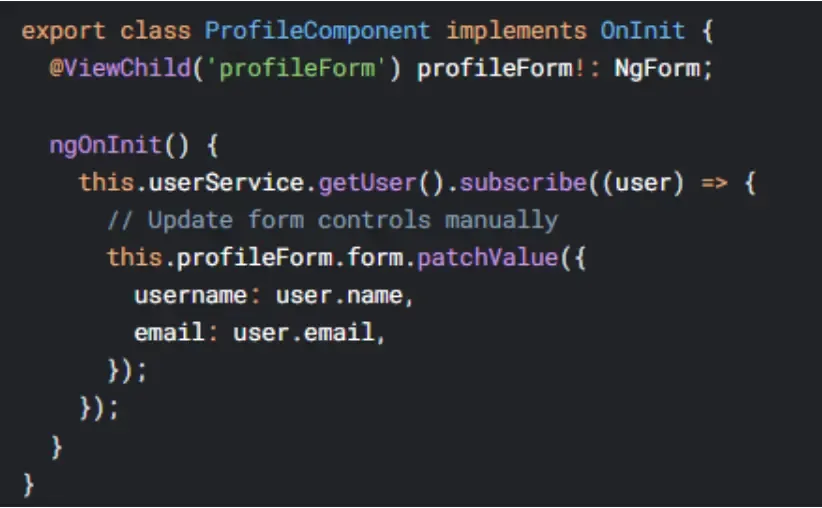
If want to have more control over the form, you can make use of @ViewChild and get the reference of the NgForm and update the values programmatically, similar to Reactive Forms.
Key Notes:
Reactive Forms provide more fine-grained control but are not as intuitive and simple as [(ngModel)] is.
If you are using NgForm’s patchValue() you are getting some reactive-style updates in your Template-Driven forms.
Key Differences and When to Use Each
Here are some of the key differences between the 2 forms and when to use them
Aspect | Reactive Forms | Template-Driven Forms |
Form Definition | Explicit control with FormGroup and FormControl | Implicit form model via directives (ngModel) |
Data Binding | One-way binding (manual control via FormControl) | Two-way binding ([(ngModel)]) |
Best Use Case | Complex forms, dynamic logic, and async validation | Simple forms, quick implementation |
Control Flexibility | High flexibility with setValue() and patchValue() | Simpler but less flexible |
Validation and Logic | Easier to handle complex validation and logic | Limited validation and logic control |
When to Use Reactive Forms:
When you want dynamic control over the structure of your form (e.g., add/remove fields).
Occasionally, when handling complex validation and asynchronous tasks.
When form has dynamical logics and fields that each one of them depends on evolution of others.
When to Use Template-Driven Forms:
Use React state when you’re building simple forms with simple logic.
When you like to use a declarative way of writing forms.
If you don’t want a complex form behavior, and require pace in development
Conclusion
When working with forms in Angular, you have two options: you can use reactive forms or template-driven forms.
Reactive Forms provide greater flexibility and control, allowing you to manipulate form validation with a direct or reactive instance of the FormGroup model.
Template-driven forms provide an alternative to reactive forms, especially for direct and simple forms where fast development and ease of use are essential.
Having a good knowledge of the pros and the cons of both solutions will empower Angular developers to make some appropriate solutions that are maintainable, efficient, and scalable in their form implementations.
By leveraging the right approach, you can create forms that are both dynamic and user-friendly, enhancing the overall user experience of your application.

Ramesh Vayavuru is the Founder & CEO of Soft Suave Technologies, with 15+ years of experience delivering innovative IT solutions.
Related Blogs