
TL;DR :-
Unlock rapid automation for your DevOps workflows with AI.
Learn practical steps, best practices, and tackle key implementation challenges.
Explore advanced tools, real use cases, and trends shaping the future of DevOps.
You’re running late on a deploy, logs are blowing up, and everyone’s staring at dashboards like they’re magic mirrors. Sound familiar? Now imagine your systems catching problems before you even know they exist.
That’s the reality when AI steps into DevOps. It’s not just automation, it’s intuition coded into pipelines. AI learns, predicts, and transforms how your teams work, freeing your people to focus on creativity, not chaos.
This isn’t about replacing engineers. It’s about arming them with a thinking partner that optimizes, critiques, and never sleeps.
Understanding AI and DevOps
DevOps connects your development and operations teams. Simple, right?
But here’s where it gets interesting. Traditional DevOps methodology relies heavily on manual processes, reactive monitoring, and human decision-making
You know the routine – a system fails, alerts are triggered, someone looks into it, and then solutions are implemented. AI changes this game completely.
Artificial Intelligence brings predictive capabilities, automated decision-making, and intelligent insights to your DevOps workflows. Instead of waiting for issues to surface, AI analyzes patterns, predicts failures, and even suggests solutions.
When AI meets DevOps, something magical happens. Your systems become self-aware. They learn from historical data, adapt to changing conditions, and make intelligent decisions without human intervention.
Here’s what this looks like practically:
Predictive Analytics: AI analyzes deployment patterns and predicts potential failures before they occur, reducing downtime by up to 50%.
Automated Decision Making: Systems automatically scale resources, route traffic, or trigger rollbacks based on real-time conditions.
Intelligent Monitoring: AI filters noise from alerts, prioritizes critical issues, and provides contextual insights for faster resolution.
Self-Healing Systems: Infrastructure automatically detects and resolves common issues without manual interventions
This means both AI and DevOps evolve together. Your AI models get smarter with more data, while your DevOps processes become more efficient with AI insights.
Struggling With Downtime? You Need DevOps Wizards on Your Side!
Every minute down is costly. Our AI-powered developers turn pain into profit; seamless automation, instant alerts, stronger deployments. Make downtime vanish for good.
Boost My TeamKey Application in DevOps
Where exactly does AI fit into your DevOps toolkit? Let’s break down the most impactful applications you can implement today.
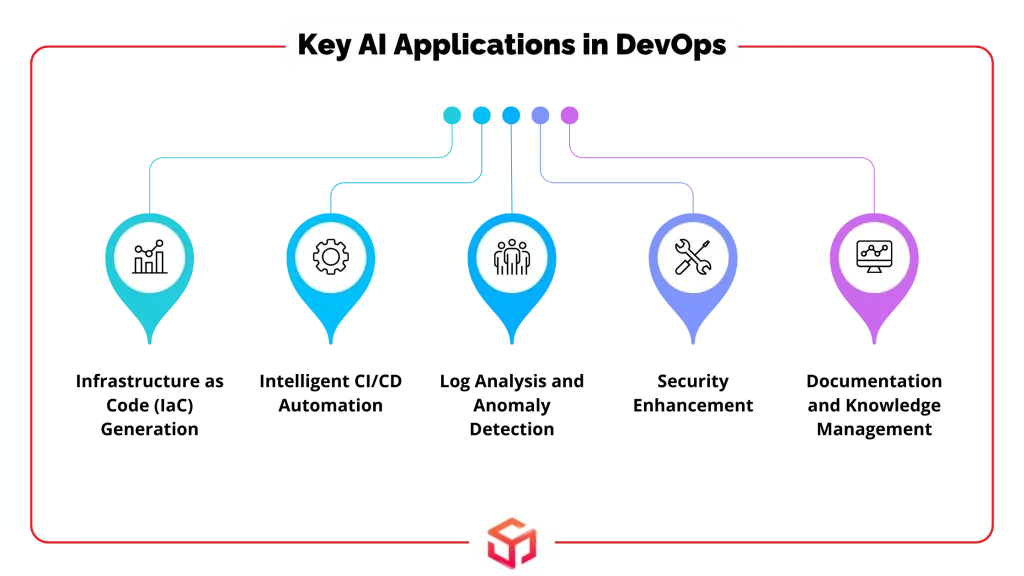
Infrastructure as Code (IaC) Generation
AI tools like ChatGPT and Pulumi AI can generate infrastructure code based on simple descriptions. Need a Kubernetes deployment with specific resource limits? Just describe it, AI writes the YAML, cutting setup time from hours to minutes, whether you’re provisioning a new database or deploying Java Applications on Kubernetes.
Benefits you’ll see immediately:
Faster Development: Generate complex configurations in minutes, not hours.
Reduced Errors: AI follows best practices and catches common mistakes automatically.
Consistency: Every generated configuration follows the same patterns and standards
Intelligent CI/CD Automation
Your CI/CD pipeline becomes smarter with AI integration. Instead of static rules, you get dynamic workflows that adapt based on code changes, historical data, and system conditions.
Key capabilities include:
Automated Testing: AI generates test cases based on code analysis and identifies high-risk areas for focused testing.
Smart Deployments: Systems automatically choose optimal deployment strategies based on change risk and system load.
Failure Prediction: AI analyzes build patterns to predict which deployments might fail before they happen.
Log Analysis and Anomaly Detection
AI strengthens your DevSecOps by continuously monitoring for security threats, analyzing code for vulnerabilities, and ensuring compliance with security policies.
Security benefits include:
Automated Vulnerability Scanning: AI scans code and infrastructure for security issues in real-time.
Threat Detection: Machine learning identifies unusual patterns that might indicate security breaches.
Policy Enforcement: AI generates and enforces security policies automatically across your infrastructure.
Documentation and Knowledge Management
AI helps maintain up-to-date documentation, generates runbooks, and provides contextual help when team members need it.
Documentation improvements:
Auto-Generated Docs: AI creates documentation from code comments, configuration files, and system behavior.
Intelligent Search: Find relevant information quickly using natural language queries.
Dynamic Updates: Documentation stays current as your systems evolve.
Step-by-Step Guide to Implement AI in DevOps
Are you prepared to engage in hands-on activities? Here’s your practical implementation roadmap based on proven strategies from successful teams.
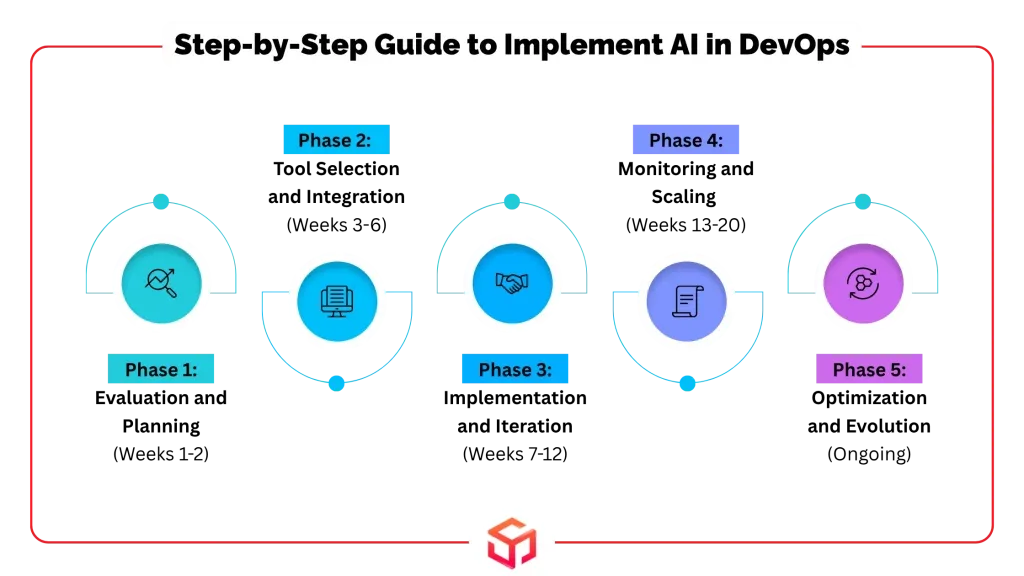
Phase 1: Evaluation and Planning (Weeks 1-2)
Start by understanding your current pain points. You can’t fix what you don’t measure.
Assessment:
Analyze your existing DevOps processes and identify bottlenecks
Review incident reports to find recurring issues
Survey team members about time-consuming manual tasks
Document current tool integrations and data flows
Strategic Goal Setting:
Use SMART criteria for your AI integration goals
Specific: Target exact processes like “automate 70% of routine deployment tasks”
Measurable: Define metrics like “reduce incident response time by 40%”
Achievable: Set realistic timelines based on team capacity and resources
Relevant: Align with business objectives like improved customer satisfaction
Time-bound: Establish clear deadlines for each implementation phase
Team Preparation
Conduct cross-functional training sessions on AI fundamentals
Identify team members interested in becoming AI champions
Establish communication channels for sharing learnings and challenges
Phase 2: Tool Selection and Integration (Weeks 3-6)
Not all AI tools are created equal. Choose wisely.
Tool Assessment Framework:
Evaluate integration capabilities with existing DevOps stack
Consider scalability requirements for future growth
Assess security and compliance requirements
Review vendor support and community resources
Proof of Concept (POC):
Test selected tools in isolated environments before full deployment:
Limited Scope: Start with one specific use case, like log analysis
Controlled Environment: Use non-production systems for initial testing
Measurable Outcomes: Define success criteria before starting the POC
Documentation: Record lessons learned and performance metrics
Automated Integration:
Develop scripts for tool deployment and configuration
Create rollback procedures for failed implementations
Establish monitoring for AI tool performance and resource usage
Is Your DevOps Pipeline Slowing Down at Every Step?
Your releases drag, bugs multiply, and scaling feels impossible. Fix it fast! Our experts overhaul workflows, automate chaos, and push innovation front and center.
Get Help NowPhase 3: Implementation and Iteration (Weeks 7-12)
Time to go live. But do it smart.
Incremental Rollouts:
Deploy AI capabilities gradually to minimize risk and maximize learning opportunities:
Start Small: Begin with low-risk, high-impact use cases
Monitor Closely: Track performance metrics and user feedback continuously
Iterate Quickly: Make adjustments based on real-world performance
Scale Gradually: Expand to additional use cases once initial implementations prove successful
Data-Driven Refinement:
Collect performance data from AI implementations
Analyze patterns to identify optimization opportunities
Refine algorithms based on production feedback
Maintain feedback loops between AI outputs and human validation
Agile Feedback Loops:
Implement weekly review sessions for AI performance
Create channels for team feedback on AI tool effectiveness
Establish processes for rapid iteration and improvement
Document best practices and lessons learned
Phase 4: Monitoring and Scaling (Weeks 13-20)
Your AI is working. Now make it work better
Real-Time Monitoring
Implement comprehensive monitoring for AI system performance
Set up alerts for anomalies in AI tool behavior
Monitor important data such as resource utilization, accuracy, and response time.
Create dashboards for visibility into AI system health
Scalability Planning:
Assess infrastructure requirements for expanded AI usage
Plan for data storage and processing capacity growth
Evaluate team training needs for broader AI adoption
Identify additional use cases for AI implementation
Knowledge Sharing:
Maintain detailed documentation of AI implementations
Create training materials for new team members
Establish communities of practice for sharing experiences
Document troubleshooting guides and best practices
Phase 5: Optimization and Evolution (Ongoing)
Keep improving. AI gets better with time
Continuous Optimization:
Regularly review AI performance metrics and adjust accordingly
Implement automated retraining for machine learning models
Optimize resource allocation based on usage patterns
Explore advanced AI capabilities as they become available
Technology Vigilance:
Stay updated on emerging AI technologies and tools
Evaluate new opportunities for AI integration
Participate in AI and DevOps communities for knowledge sharing
Plan for technology upgrades and migrations
Best Practices for AI-Driven DevOps
You’ve got the roadmap. Now here are the pro tips that separate successful implementations from expensive experiments.
Start Small, Think Big
Don’t try to revolutionize everything at once. Pick one specific problem and solve it well.
Focus Areas for Quick Wins:
Automated alert filtering and prioritization
Simple anomaly detection in system metrics
Code quality analysis and suggestions
Basic deployment automation
Maintain Human Oversight
AI is powerful, but it’s not foolproof. When making important decisions, keep humans informed.
Governance Framework:
Approval Gates: Require human approval for sensitive operations like production deployments
Audit Trails: Maintain comprehensive logs of AI decisions and actions
Fallback Mechanisms: Ensure systems fail gracefully when AI components malfunction
Regular Reviews: Schedule periodic assessments of AI decision quality and impact
Prioritize Data Quality
Your data determines how well your AI performs. You get out what you put in, no shortcuts around quality.
Data Management Strategies:
Data Validation: Implement automated checks for data quality and completeness
Data Lineage: Track data sources and transformations for transparency
Privacy Protection: Ensure compliance with data privacy regulations
Regular Cleaning: Schedule periodic data cleanup and validation processes
Foster Collaboration
Break down silos between development, operations, and data teams.
Unlock the True Speed of DevOps With Soft Suave’s Talent
Curious about rapid releases? Imagine automated deployments and predictive systems. Our skilled DevOps talent stands ready; engage and accelerate your progress now.
Hire TodayTeam Integration Approaches:
Cross-functional Teams: Include AI expertise in DevOps teams
Shared Metrics: Establish common KPIs across all teams
Regular Communication: Schedule frequent sync meetings and updates
Knowledge Sharing: Create forums for sharing experiences and learnings
Measure Everything
If it is not measurable, it cannot be improved. Track both technical and business metrics.
Key Performance Indicators:
Technical Metrics: Response time, accuracy, system reliability, resource utilization
Business Metrics: Customer satisfaction, time to market, cost reduction
Process Metrics: Deployment frequency, lead time, mean time to recovery
Team Metrics: Developer productivity, incident resolution time, training completion
Challenges in Using AI in DevOps
Let’s be real. AI implementation isn’t all sunshine and automated deployments. Here are the challenges you’ll face and how to tackle them.
Data Quality and Availability
Your biggest enemy? Inconsistent, incomplete, or biased data.
Common Data Issues:
Fragmented Sources: Data scattered across multiple systems and formats
Quality Inconsistency: Different teams using different data standards
Historical Gaps: Missing historical data needed for training AI models
Real-time Challenges: Difficulty accessing current operational data
Solutions:
Implement data governance frameworks from day one
Establish data quality metrics and monitoring
Create standardized data collection and storage processes
Invest in data integration tools and platforms
Skills Gap
Finding people who understand both AI and DevOps is tough. Training existing teams takes time and resources.
Skill Development Strategies
Internal Training: Develop comprehensive AI education programs
External Partnerships: Collaborate with universities or training providers
Hands-on Learning: Provide opportunities for practical AI project experience
Mentorship Programs: Pair experienced practitioners with those learning AI skills
Model Drift and Maintenance
AI models degrade over time as conditions change. Your perfect model today might be useless tomorrow.
Drift Management Approaches:
Continuous Monitoring: Track model performance metrics over time
Automated Retraining: Schedule regular model updates based on new data
Performance Thresholds: Set alerts when model accuracy drops below acceptable levels
Version Control: Maintain multiple model versions for rollback capabilities
Security and Privacy Concerns
If AI systems aren’t well protected, hackers can use them to launch attacks.
Security Considerations:
Data Protection: Encrypt sensitive data used for AI training and inference
Access Controls: Implement role-based access to AI systems and data
Audit Logging: Maintain comprehensive logs of AI system access and decisions
Regular Security Reviews: Schedule periodic security assessments of AI implementations
Integration Complexity
Making AI tools work with existing DevOps toolchains isn’t always straightforward.
Integration Strategies:
API-First Approach: Choose AI tools with robust API capabilities
Standardized Interfaces: Use common protocols and data formats where possible
Gradual Migration: Introduce changes gradually to avoid causing problems or interruptions.
Comprehensive Testing: Validate integrations thoroughly before production deployment
Emerging Trends of AI in DevOps
The future’s already knocking. Here’s what’s coming next in AI-driven DevOps.
Autonomous Operations
We’re moving toward self-managing infrastructure that requires minimal human intervention.
Autonomous Capabilities:
Self-Healing Systems: Infrastructure that automatically detects and resolves issues
Adaptive Resource Management: Systems that dynamically adjust resources based on demand patterns
Intelligent Incident Response: Automated investigation and resolution of common problems
Predictive Maintenance: Proactive replacement or updating of components before failure
Advanced ChatOps Integration
Conversational interfaces are becoming more sophisticated, enabling natural language interactions with complex systems.
ChatOps Evolution:
Natural Language Queries: Ask questions about system status in plain English
Context-Aware Responses: AI understands project context and provides relevant information
Multi-tool Integration: Single interface for interacting with the entire DevOps toolchain
Intelligent Assistance: AI suggests solutions based on historical data and best practices
Edge AI and Distributed Intelligence
Processing is moving closer to data sources for faster response times and improved reliability.
Edge Computing Benefits:
Reduced Latency: Local processing enables real-time decision making
Improved Reliability: Less dependence on centralized systems and network connectivity
Enhanced Privacy: Sensitive data processing stays local
Bandwidth Optimization: Reduced data transfer requirements
Generative AI for Code and Infrastructure
AI is getting better at creating code, configurations, and entire system architectures.
Generative Capabilities:
tive Capabilities:
Infrastructure Generation: AI creates complete infrastructure definitions from requirements
Code Optimization: Automatic refactoring and performance improvements
Test Generation: AI creates comprehensive test suites based on code analysis
Documentation Creation: Automated generation of technical documentation and runbooks
Why Guess? Try Our DevOps Experts With a 40-Hour Free Trial
Test our skills for free – see pipeline automation, error reduction, and expert troubleshooting in action before you spend a dime. Explore, evaluate, then commit.
Try FreeAI-Powered Security (DevSecOps)
Security is becoming more proactive and intelligent with AI integration.
Security Enhancements:
Threat Prediction: AI identifies potential security issues before exploitation
Automated Remediation: Immediate response to detected security threats
Compliance Monitoring: Continuous verification of security policy adherence
Risk Assessment: Dynamic evaluation of security risks across the entire system
The next five years will see AI become as fundamental to DevOps as version control is today. Teams that start experimenting now will have significant advantages over those who wait.
Conclusion
AI in DevOps isn’t science fiction anymore; it’s your competitive advantage waiting to be unlocked. You’ve got the roadmap, the practical steps, and the insider knowledge to transform your operations.
The teams already implementing these strategies are seeing 50% cost reductions, dramatically improved reliability, and developers who actually enjoy their work again.
Stop wrestling with manual processes and last-minute problem-solving. Your infrastructure can be smarter, your deployments more reliable, and your team more productive.
The question isn’t whether AI will transform DevOps; it’s whether you’ll lead the transformation or get left behind.
Frequently Asked Questions
How does AI improve DevOps processes?
AI transforms DevOps through predictive analytics, automated decision-making, and intelligent monitoring. You’ll see 50% faster incident resolution, proactive issue detection, and self-healing systems that fix problems before users notice them.
What AI tools are used in DevOps?
Popular AI tools include ChatGPT for code generation, Dynatrace for intelligent monitoring, Testim for automated testing, and Kubiya.ai for ChatOps integration. Each tool specializes in different aspects of the DevOps pipeline.
How do I start using AI in DevOps?
Begin with a simple use case like automated alert filtering or log analysis. Follow the five-phase implementation roadmap: evaluate current processes, select appropriate tools, run proof-of-concepts, implement incrementally, and scale based on results.
What challenges come with AI integration in DevOps?
Main challenges include data quality issues, skills gaps, model drift, and integration complexity. Address these through proper data governance, team training, continuous monitoring, and gradual implementation approaches
What Types of NFTs can be created on a gaming platform?
Avatars, weapons, vehicles, land, badges, any in-game asset can become an NFT, unique and tradable by your players.
What affects the cost of NFT development?
Cost varies by project size, blockchain, graphics, features, and security. Bigger worlds and more assets mean higher investment.

Ramesh Vayavuru is the Founder & CEO of Soft Suave Technologies, with 15+ years of experience delivering innovative IT solutions.
Related Blogs